The Folloze Product Spotlight is a monthly update of new solutions, capabilities and product enhancements. Feel free to reach out to us with questions or feedback at product@folloze.com.
NEW FEATURES
Engagement Activity Report
What is it?
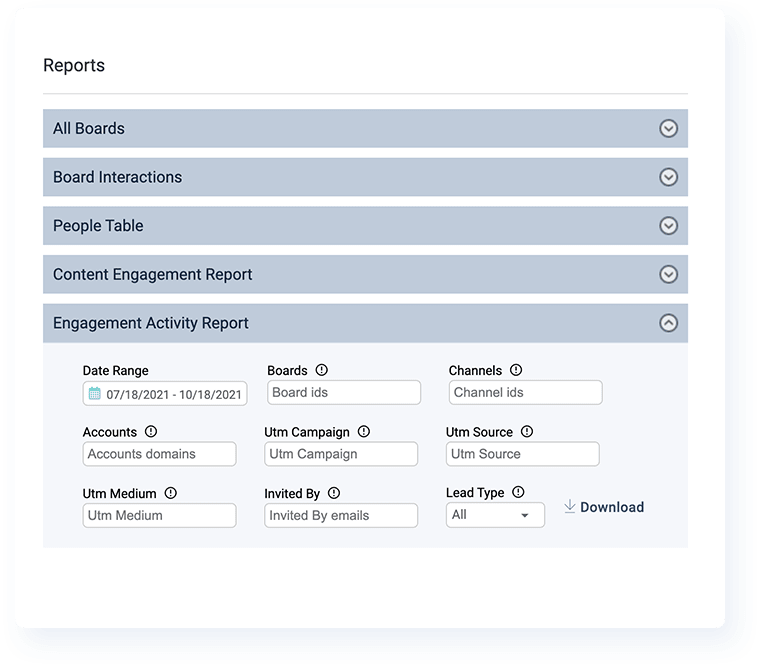
The Engagement Activity Report shows a granular breakdown of total activities performed on a Board or Boards. When this report is pulled, each row in the CSV file will display a single engagement activity performed.
With the additional filters that are available, you can further dissect the data in this report to answer important questions, like "who viewed a specific item" or "what's the engagement level of visitors coming from a specific channel".
Why is it important?
Reporting continues to be an important part of the frontline marketing workflow, both as a way to understand campaign performance for further iteration as well as a way to internally illustrate marketing ROI to the broader business.
While marketers should always be prepared to demonstrate impact on pipeline and revenue, it's also important that we report on the shorter-term engagement of specific campaigns and programs to show that we're "moving the needle" while we wait to measure the true final impact on the company's bottom line.
What are the specifics?
As with previous report types that have been released in the recent past, this report is currently available to Company Admins only for the time being and can be found under the 'Reports' section of the Company Admin window.
To pull an Engagement Activity Report, you'll need to enter either a Board ID(s) or Channel ID(s) before Folloze can prepare a CSV file of all relevant engagement activities.
Use the filters available within the report to further parse the data, including:
- Date Range: enables you to display activity data for a specific period of time
- Accounts: enables you to display activity data for a specific account(s)
- UTM Campaign: enables you to filter activity data for a specific campaign(s)
- UTM Source: enables you to filter activity data for a specific traffic source(s)
- UTM Medium: enables you to filter activity data for a specific marketing channel(s)
- Lead Type: enables you to filter between internal users or external leads
For more information on the reporting capabilities available to Company Admins today, read "Gaining Insights into Boards, People, Customer Engagement and Activity" in the Help Center.
ENHANCEMENTS
Vanity URL: Content Items
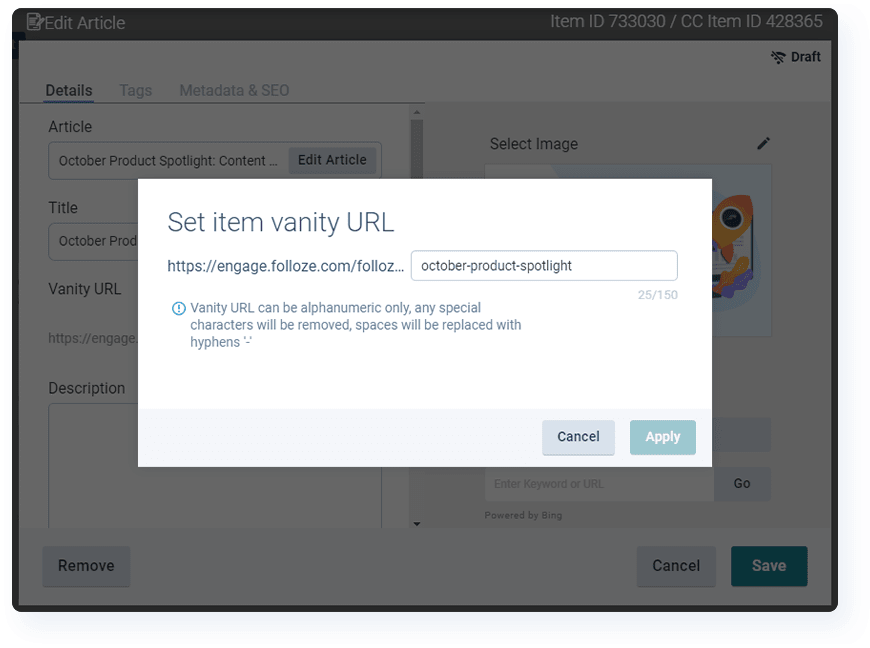
This enhancement extends the Vanity URL feature and makes it available to all individual content items as well. With this upgrade, you can now fully configure the vanity URL for any or all content items on a Board. The one caveat, of course, is that different items on the same Board cannot have the same vanity URL.
This can be particularly important for use cases where a Board is made visible to search engines, as vanity URL control is important for SEO purposes.
With this change, when a new item is added to a Board, a default URL is created based on the item's title. To make any changes or completely replace the default, simply open that item's settings and configure a new vanity URL in its place (similar to what you could already do at the Board-level).
For instructions on how to configure this yourself, read "Creating a Vanity URL for Content Items" in the Help Center.
Duplicating Boards: Custom Design & Custom Scripts/Tags
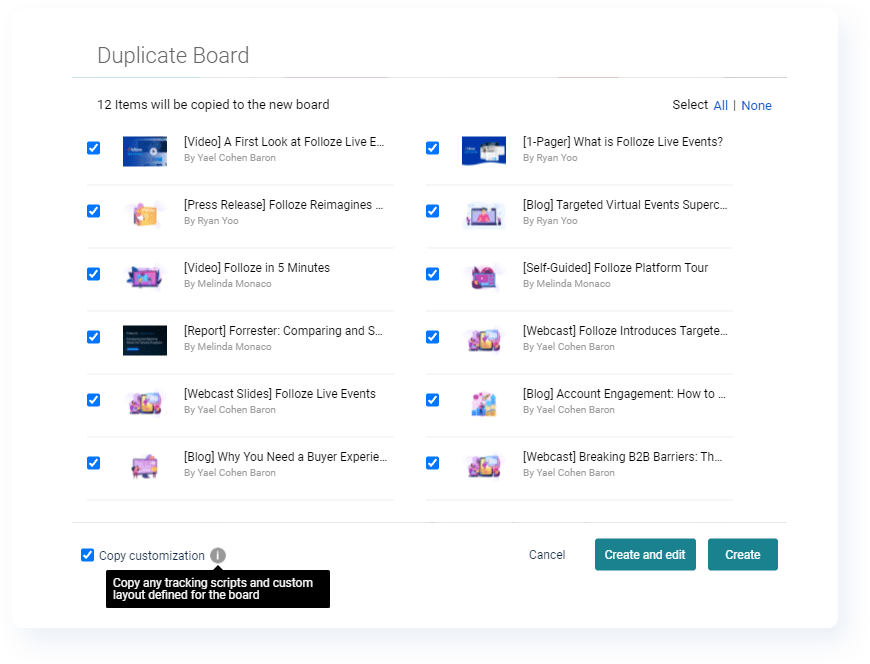
We've made an enhancement to the Board duplicating process that enables you to also copy any tracking scripts and custom layouts that were added to the original Board you're making a copy of.
When duplicating a Board, a new toggle appears in the bottom left of the pop-up dialogue that allows you to carry over these tracking scripts and design customizations if you'd like to do so.
For a quick refresher on how to make a copy of a Board, read "Duplicating a Board" in the Help Center.
New User Invitations: invitations@folloze.com
Moving forward, all new user invitations will always come from invitations@folloze.com. If you haven't already, your organization may consider whitelisting this single email address to ensure all future user invites are delivered properly.
INTEGRATIONS
Salesforce Pardot Lightning: Campaign Link Updated
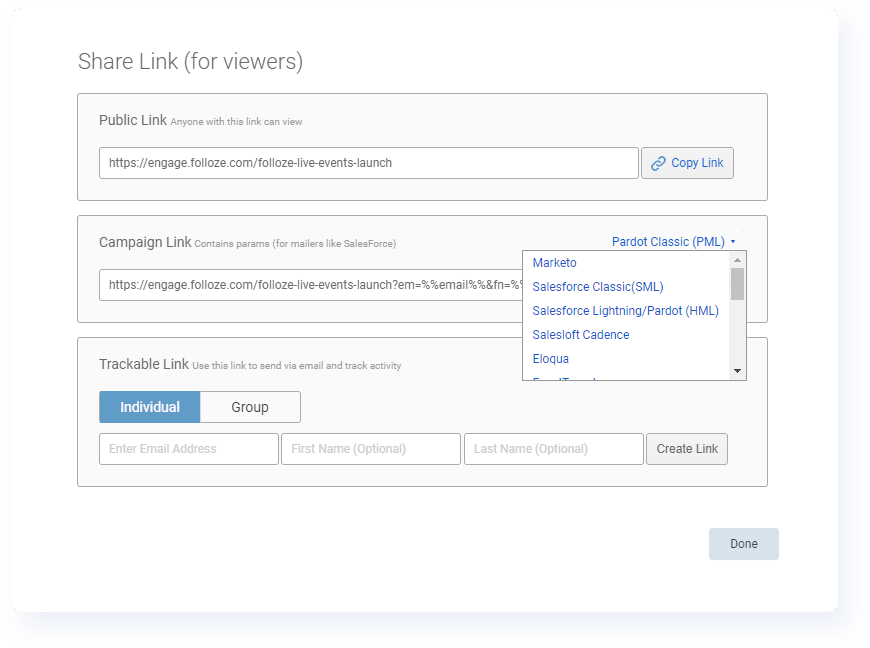
Campaign Links have been updated to properly support all the variants of merge fields used by various Salesforce platforms. Within the Campaign Link menu, you'll see these three options:
- Salesforce Classic (SML)
- Salesforce Lightning / Pardot (HML)
- Pardot Classic (PML)
When pulling a Campaign Link for email campaigns coming from any Salesforce systems, make sure you're using the proper campaign link.
For more information about campaign links and how to retrieve them, read "Create Board Links" in the Help Center.
CUSTOMER SUCCESS SPOTLIGHT: Amanda Sapata

When asked for a fun fact, Amanda thought you should know...
In 2017, I completed the 200-hour yoga teacher training and became a registered yoga instructor. Since then, I like to lead yoga classes in my spare time.
When it comes to using Folloze, Amanda thought you should know...
Design elements like Side-By-Side and Promotion Areas can be used in many ways. I've seen customers use these sections to highlight team members, partner logos, value-add messaging, testimonials, event promotions and so much more. Get creative!
If you want to learn more about these sections and how to leverage them in your own Boards, check out "Designing a Promotion Area" and "Designing a Side By Side Area" in our Help Center.
NOTE TO READERS
Q3 is in the books, and it's on to Q4 now. For those of you on a calendar fiscal year like us, welcome to Q4!
As with any Q4, the Folloze team is hard at work wrapping up 2021 as we look towards 2022. For the Product team, that means beginning to look towards next year and considering which strategic investments make the most sense for all of our customers, both current and future. One thing that makes this job so much easier is how vocal our customers are. It's not lost on me how valuable customer feedback is, and building a platform for B2B marketers focused on engagement across the buyer experience is made easier because of the feedback and open communication from users like you.
One thing I'm particularly excited for is our future vision for reporting. This year, we released multiple new reporting capabilities, but we're far from done. While we've released most of these reporting capabilities as Admin-only on initial release, we're merely laying the groundwork for being able to provide these reporting capabilities to all users and not just admins. I know it's quite the cliché, but this'll be a gamechanger in my opinion. I can't say too much more at this point, but keep an eye out as we continue to work on this set of capabilities.
In the meantime, check out what's been released this month, and if you have any further questions, your Customer Success Managers will be more than happy to help. See you next month!
- Ryan 'Yooster' Yoo