The Folloze Product Spotlight is a monthly update of new solutions, capabilities and product enhancements. Feel free to reach out to us with questions or feedback at product@folloze.com.
NEW FEATURES
Board Performance Report
What is it?
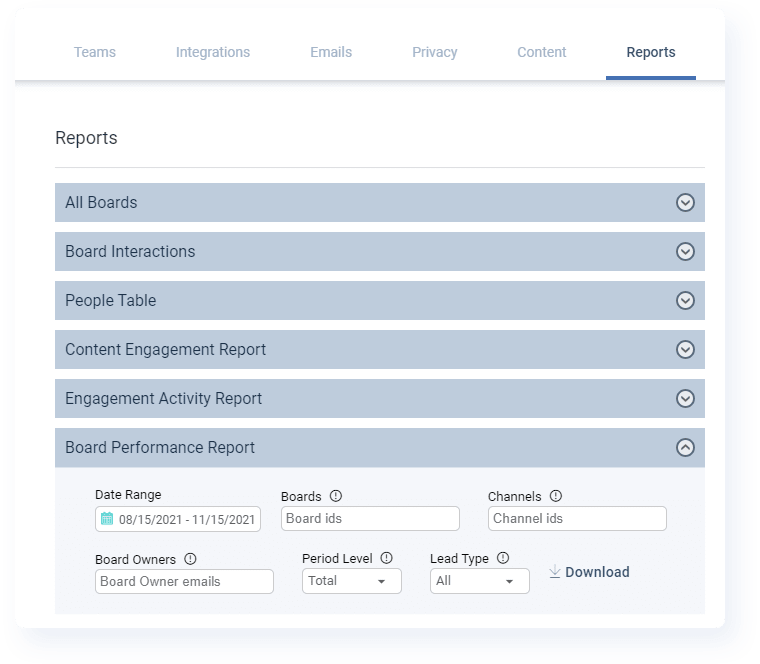
The Board Performance Report is a new type of report that displays Board performance by aggregating measured engagement for one or more Boards within a set Date Range. In this case, performance is defined as the number of unique actions and unique visitors within a specific time period (i.e. monthly, total or both).
Why is it important?
Since we've released a number of new reporting capabilities recently, there's no need to restate just how important reporting on marketing performance is for creating internal trust with other teams, like sales and even individual members of the executive team.
What's unique with this report is the ability to report on a number of different Boards at the same time and display their overall performance over time. Especially for our enterprise customers, this is a fairly common way of providing status updates on live Boards and gives a glimpse into which Boards are producing the highest levels of engagement. Of course, you should always keep in mind that different Boards serve different purposes when comparing numbers between Boards.
What are the specifics?
Just like past report releases, this new report can be found by Company Admins under 'Reports' within the Company Admin panel.
To pull a Board Performance Report, you'll need to enter at least one Board ID number. You may want to adjust the Date Range and Period Level each time you export depending on your particular reporting needs at the time.
We've updated our documentation on reporting capabilities to include more details on Board Performance Reports. To learn more, read "Gaining Insights Into Boards, People, Engagement and Activity" in the Help Center.
ENHANCEMENTS
Articles: Article Header Layout
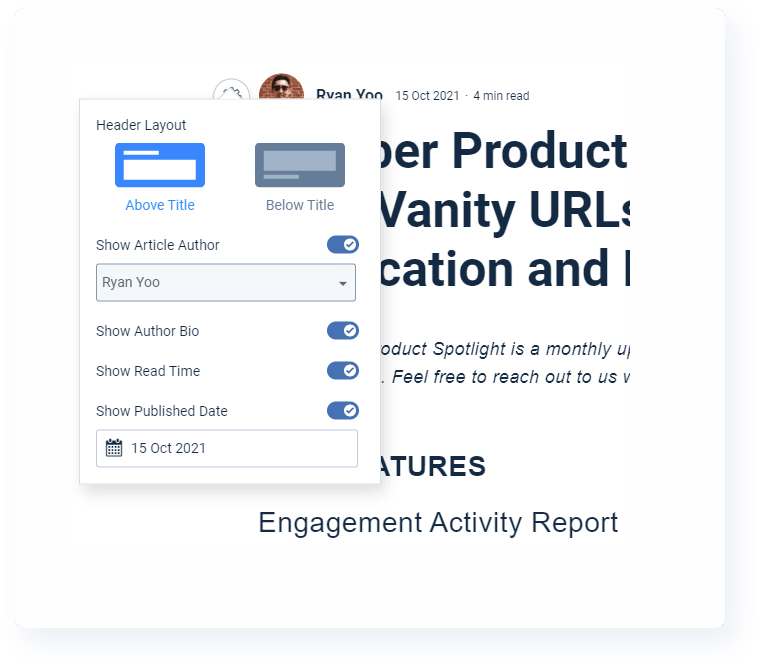
There's a new option available for selecting the location of the 'Article Header', which contains information about the author, publishing date, and suggested read time. You can choose to display this information either above the title line or below.
Do note that this doesn't impact where the Author Bio is displayed, as that will always still be displayed at the bottom of an Article when enabled.
To learn more about creating your own Articles, including how to set up an Author Bio and activate it, read "Adding an Article to a Board" in the Help Center.
Account Engagement Dashboard: Filters & Load Time
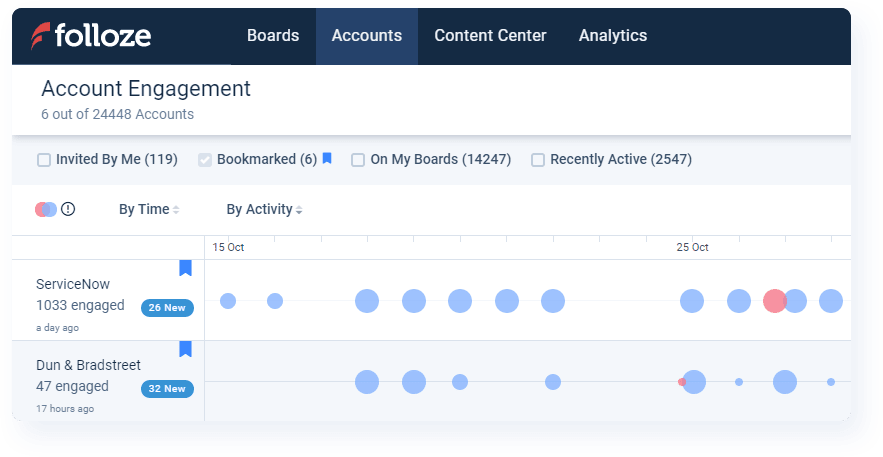
This month, there are two smaller enhancements being released for the Account Engagement Dashboard.
First, you'll find two new filtering options at the top of the Account Engagement Dashboard. The first new filter, 'On My Boards', will display any accounts that have engaged with a Board that you currently have access to (as either an Owner, Editor or Subscriber). The second new filter, 'Recently Active', will display any accounts that have recorded an engagement activity within the previous 3 months from the current date.
Second, we've made some under-the-cover optimizations to significantly improve load time when accessing the Account Engagement Dashboard in the first place. These optimizations, combined with the current filtering options, mean less time spent waiting as you check on overall account engagement across any, or all, Boards.
For a refresher on how the Account Engagement Dashboard works and best practices for using these insights, read "Analyzing Account Engagement Metrics" in the Help Center.
Get Link: New Shortcuts
There's no change here to the 'Get Link' functionality, but as part of our continued efforts to improve the usability of the platform, we're making the Get Link shortcut even easier to access in the first place.
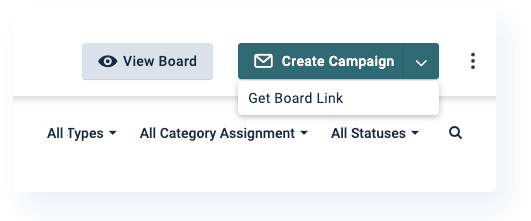
First, there's a new drop-down menu under the Create Campaign button with a shortcut to Get Board Link. This drop-down menu can be found in the top right when you're editing any individual Board.
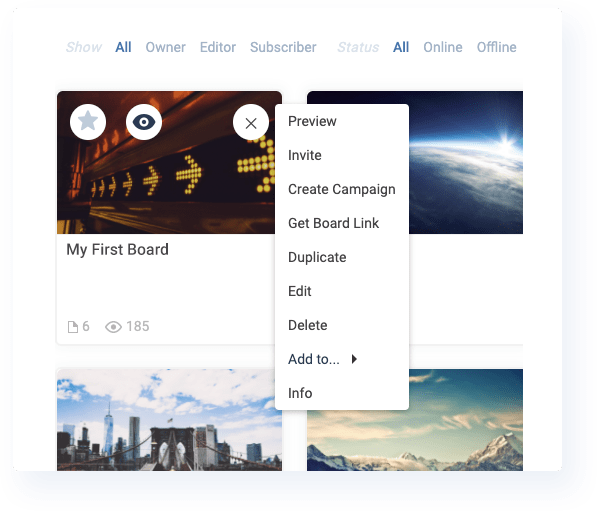
Second, you can Get Board Link for any Board from the home page of Folloze by hovering over a Board and clicking on the settings icon in the top right of the Board thumbnail.
COMING SOON
Company Templates
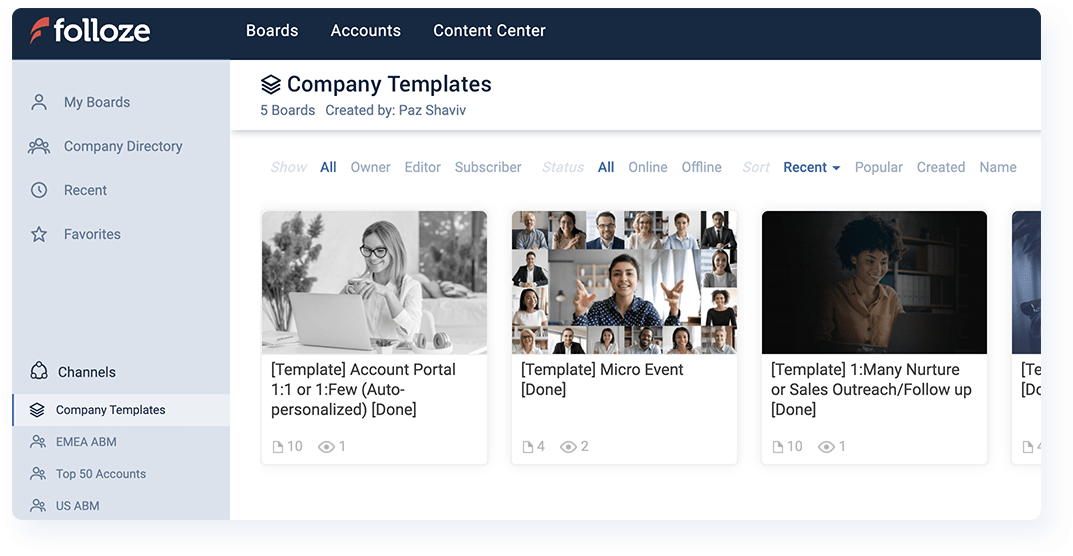
In a matter of days, Company Templates will launch to all Folloze customers. When this new feature is enabled, all Folloze users will see a new company-wide channel named 'Company Templates'. While only Admins and Company Editors will have the ability to edit existing templates or add new ones, all users will be able to see the template Boards in this channel and make copies as needed.
If you're already an existing customer of Folloze, you may have set up something similar yourself. The release of the official feature simply streamlines the process of posting templates and sharing to large groups of users for easy access. Brands that are successfully leveraging template Boards currently build templates one of two ways:
- Templates as a starting point that Creators can final-mile
- Templates that serve as a reference for best layout practices and branding standards
Company Templates will be released within the next week or two, so if you're an Admin or Company Editor, keep an eye on your inbox for an announcement email that contains further information and instructions on how to get started.
CUSTOMER SUCCESS SPOTLIGHT: Cassie Ricci

When asked for a fun fact, Cassie thought you should know...
"Although I use a MacBook Pro at work, I'm a PC enthusiast and love watching hardware reviews and PC builds on YouTube in my spare time. I still have (and use) my first PC build from over five years ago! I think my next build will be an ITX..."
When it comes to using Folloze, Cassie thought you should know...
"We recently made script application accessible on the front-end for admin users of Folloze. I couldn't be happier about this development! The possibilities are endless - you can connect Google Tag Manager (GTM) and load in various scripts on an organization or Board level. I really believe that this feature gives companies the control and flexibility to manage their instance [of Folloze] as well as customize individual Boards."
If you want to learn more about adding custom scripts to one or multiple Boards, check out "Adding Custom Scripts to Boards" in our Help Center.
NOTE TO READERS
Q4 is halfway over, which is another way of saying that the end of Q4 is quickly approaching. It's kinda crazy how fast time has felt like its flown this past year. I'm sure a part of that is due to the ongoing impact of COVID, but regardless of how your year has gone, these last 45 days are our chance to put a stamp on how we want 2021 to appear in the books.
To tell you the truth, I've never understood this idea that only Sales should feel the stress of Q4. Perhaps it's not as common as I think, but the sentiment is certainly out there. The close of Q4, good or bad, impacts every one of us, and this is our opportunity to really get in the trenches with Sales and see what can be done to (1) help close existing opportunities, (2) rip out competitors up for renewal, or (3) find short-cycle pipeline to close any revenue gaps.
Maybe there isn't always something Marketing can do to directly impact the rest of this quarter, but it really should be a team effort. Do professional soccer players stop moving just because someone else on the field has the ball at the time?
Anyways, mini-soapbox over. On a different topic, I'm experimenting with the idea of launching a marketing meme campaign because laughing at ourselves can be some of the best relief. As a brief teaser, here is my absolute favorite so far. Hope you enjoy, and see you next month!
- Ryan 'Yooster' Yoo