The Folloze Product Spotlight is a monthly update of new solutions, capabilities, and product enhancements. Feel free to reach out to us with questions or feedback at product@folloze.com.
ICYMI!
If you haven’t heard… June marked a huge milestone for Folloze! We announced Folloze Buyer Experience Platform 3.0. This major upgrade delivers powerful design tools and data insights to make the Folloze you love even easier and more powerful. Now you can build anything you want, and measure it all!
We’ll be rolling this upgrade out to our customers soon, and your CSM will be keeping you up to date. In the meantime, be sure to check out all of the latest news and updates about Folloze Buyer Experience Platform 3.0 here.
And you can take a look inside the new platform here.
NEW FEATURES
More User Management Options
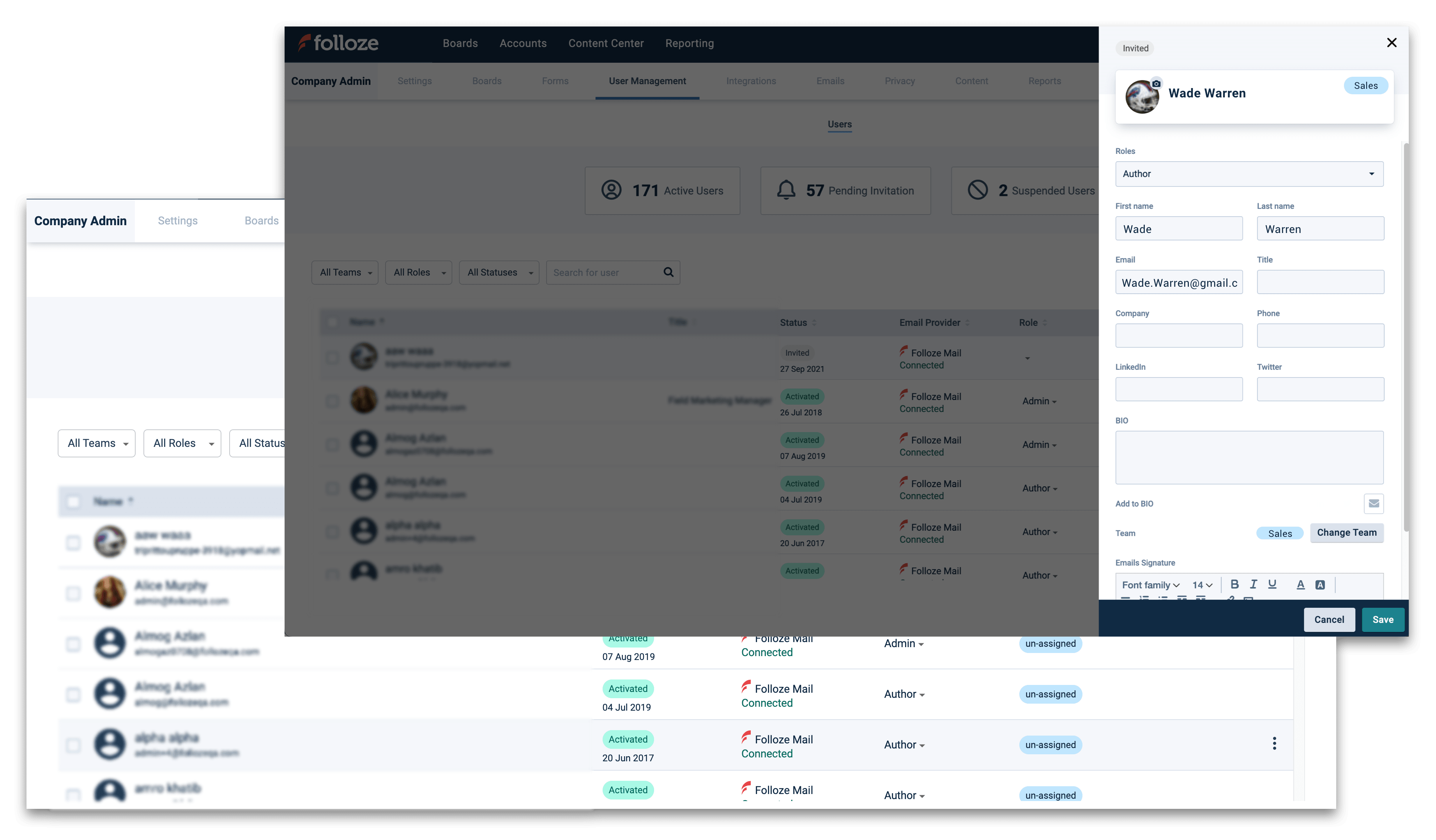
Hey Admins! We’ve made it simpler to manage users by streamlining the interface of the User Management page. You can now filter users not just by team, but by role and status as well. These additional filters make it easier to categorize and search users. We’ve also added more self-service capabilities, including the ability to make a User an Admin in addition to author and company editor.
Admins can also now edit profiles on behalf of Users, making it simpler to make updates to common issues like missing signatures, etc., and update User bios, and to add/change photos.
Finally, Admins now have the ability to bulk upload User invites in groups vs. sending individual invites.
Learn more about how to manage users with the new user manager here: https://help.folloze.com/hc/en-us/articles/1500010923782-Managing-Folloze-Users-
Save Reports Filters
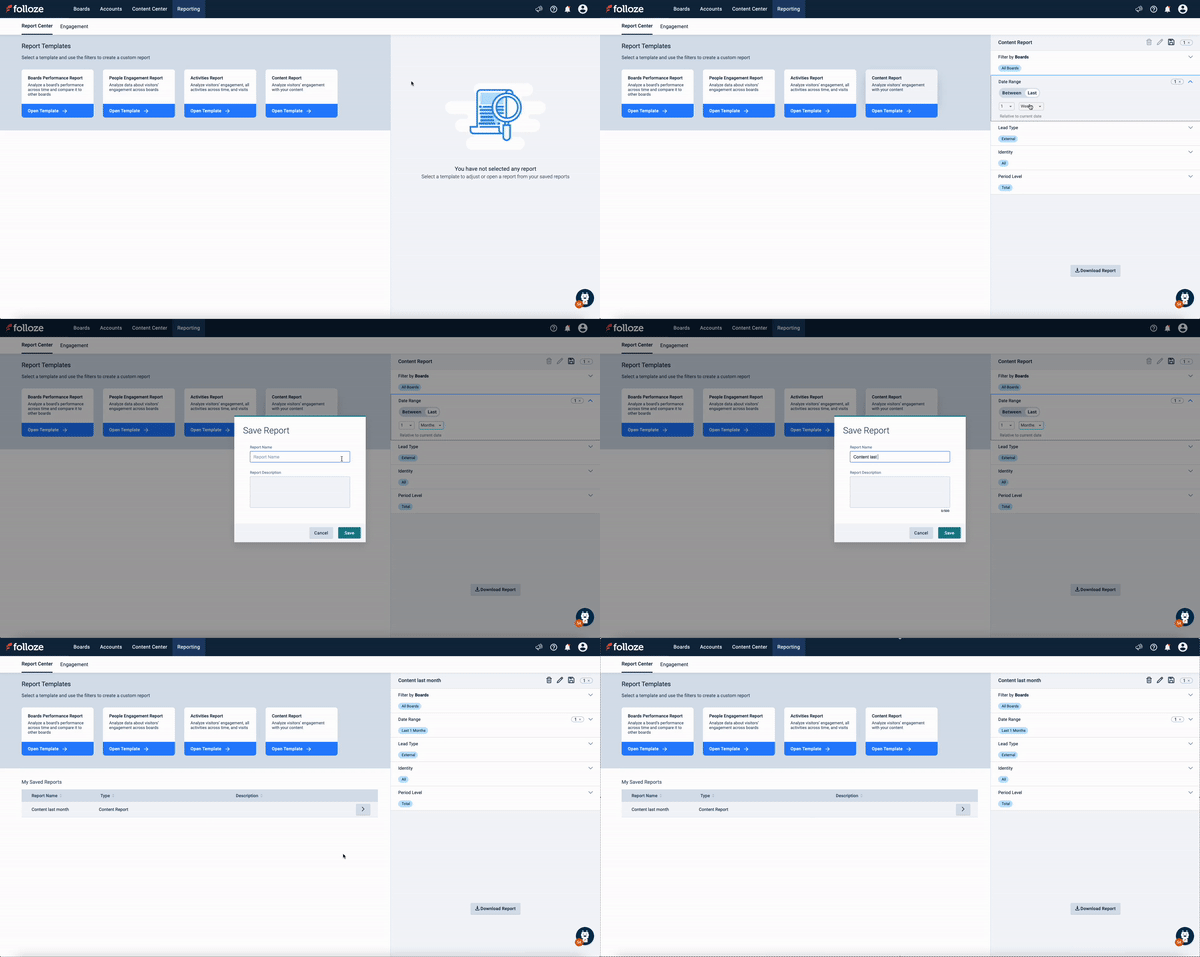
You can now save filter selections under My Reports to more easily and quickly create routine reports without the need to start over each time. You can select any of the report templates, filter them by any parameter, and then download for a one-time report, or save the report template for future use. No need to select the filters every time. You can also save time creating similar reports by using the ‘Save As’ option to make a copy of the report and implement minor changes.
To learn more, check out this article in our Help Center.
ENHANCEMENTS
New People Engagement Report
We’re excited to announce the new People Engagement Report to the Folloze platform. Now you can view engagement data by visitor and find out how they engaged across your Boards. Essentially an enhancement to the Pulse report download feature, the People Engagement report allows you to run reports across multiple boards vs. downloading them on a board-by-board basis. Downloads are based on filtered parameters in the report.
New Report Timeframes
You now have the option to generate reports by ranges of time in addition to specific calendar dates. For example, you can apply ranges to pull reports for the last week, or last several days.
Search Live Boards by URL Variation
No more frustration when you can’t remember the name or ID number of a Board! You can now search Boards in the Folloze app by full, partial, or vanity URL to easily find any Board based on its live link.
Meta Tag Editing Control
Customers using SEO at the Board level can now add, edit or update the meta title and description that auto populates in the SEO option under the Board Settings menu.
CUSTOMER SUCCESS SPOTLIGHT: Sagi Palatty

Some fun facts and insights from Customer Success Engineer Sagi Palatty…
I am a techie at heart! I like all things technology. You name it, whether it is personal computers, servers or smart home technology, I am usually researching these topics in my spare time. While I was at Northeastern University, I built my first computer and loved every minute of it! Ever since then, I have been building and repairing my own computers.
I’m also a big sports fan and my favorite basketball team is the New York Knicks. Any chance I have, I am usually on the basketball courts with my two daughters and hope to take them one day to Madison Square Garden to see the Knicks play!
When it comes to audience engagement, Sagi thought you should know....
You can engage your audience by giving them a personalized experience using the URL Parameter personalization capability in Folloze. Once you set a variable (var) using the personalization studio, you can add ?var= at the end of the public link and it will change the content based on the audience you are targeting. For more information on this topic, check out this informative article in our Help Center.
DON’T MISS THIS IMPORTANT FOLLOZE COMMUNITY EVENT!
Join us on June 29th at 10:00 a.m. PT/1:00 p.m. ET to see how Oracle is putting ABM at the heart of its strategic relationships. In this interactive and educational session, Karin Apjarova, Strategic Client & Account-based Marketing Director with Oracle, will share how her team leverages Folloze to deliver hyper-personalized account-based experiences.
Register here to save your spot!
NOTE TO READERS
There’s so much happening at Folloze! We appreciate you keeping your pulse on the new features and enhancements that we’re bringing you each month to help make your B2B marketing initiatives easier to execute and deliver more impactful results. Thanks for reading!
Tara McMeekin
Sr. Manager, Content Marketing