The Folloze Product Spotlight is a monthly update of new solutions, capabilities and product enhancements. Feel free to reach out to us with questions or feedback at product@folloze.com.
NEW FEATURES
Email Automation: Forms
What is it?
You can now trigger automated emails to be delivered upon the submission of any kind of form, including Promoted Forms, forms behind CTAs, and gating forms.
Why is it important?
This new feature allows you to close the loop with your buyers across several different use cases and opens the door to a more automated way to effectively follow up on Board visitors that "convert" during their visit.
For example, if you've built your Board(s) to promote a content offer across social and paid display, you can automatically deliver an email containing a link to the content your visitors have shown interest in. Of course, your visitors would ideally engage with that content on-demand the minute they request it, but the reality is that we're all inundated with info these days. A simple automated follow up with a link back to the content for reference can improve how your buyers find and engage with the content they're interested in.
Another great example of this feature in action is automating email follow up after someone completes a registration form for an upcoming event that you're promoting. Whether the event is virtual or in-person, it's always best practice to immediately follow up any registrations with additional details about the event (including a reminder of the time and day).
What are the specifics?
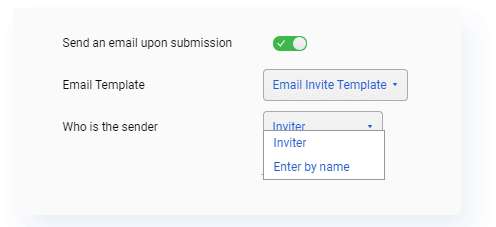
Whenever you're designing a Board and decide to turn on a form, you'll now see a new option appear below the form's settings to 'Send an email upon submission'. Turning this feature on will then prompt you to complete two additional steps:
- Select which email to send from the current Board's existing email templates
- Select who, from within your organization, to send this email through
- Note: Like standard email campaigns, the sender you select must be at least a Subscriber to the current Board.
ENHANCEMENTS
Articles: Author Bio
You can now enable an Author Bio at the bottom of any Articles you create and edit, with the option to include either your own Bio or the Bio of someone else within your organization. Keep in mind that for every Article you create, Author Bio will be turned off by default. To turn this feature on, open the Article settings and enable 'Show Author Bio'.
To set up your Author Bio in the first place, simply visit 'My Settings' in the top right corner of Folloze. You can freely write your Bio however you'd like, and you can select which social handles you'd like to include as well.
Live Events: Registration CTA & Status
The first major set of enhancements to our recently announced Folloze Live Events (AKA executing targeted virtual events on Folloze Boards) is here! This update focuses on improving how we track and display the registration status of potential attendees for an upcoming event.
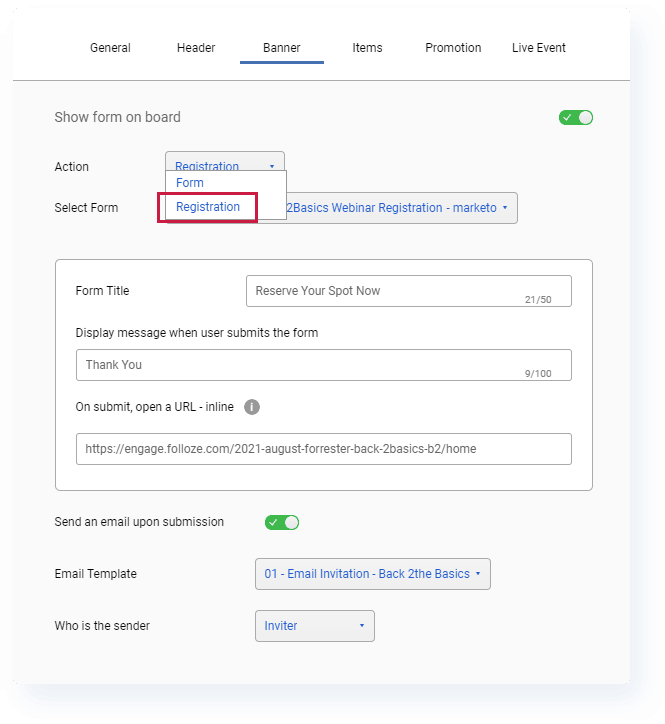
First, you'll notice a new option called 'Registration' that is available when configuring a CTA or Promoted Form. This action behaves exactly like the current 'Form' option (meaning that you're choosing to present a form to a visitor) with a single distinct difference.
If a Board visitor completes a 'Registration' form, Folloze will record an all-new action to track that the visitor has just registered for your upcoming event, meaning you'll now be able to track registration status for your invitees natively inside Folloze.
Next, inside the Pulse Table for your Live Event Board, you'll see a new column for displaying registration status. As invitees complete your registration form and reserve their spot for your event, you will see their status update inside this new column.
That gives you room to use this new status in combination with other existing features, like sending a follow up email to a filtered list of just people who have not registered yet or downloading a CSV to batch upload into other systems.
New CTA Type: Share
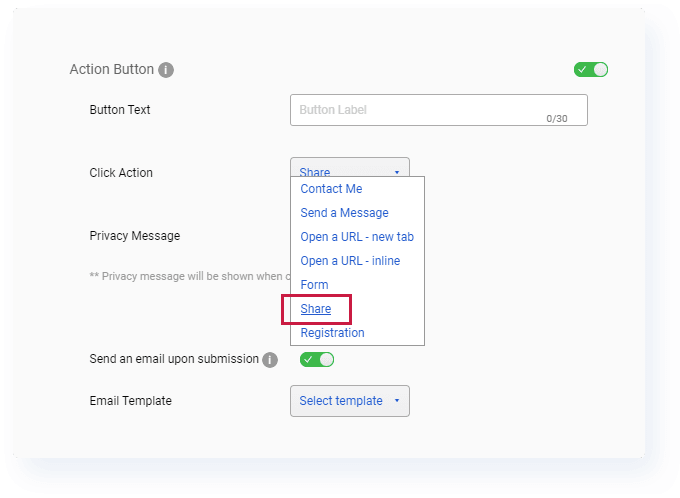
We're releasing a new CTA option called 'Share' that allows Board visitors to easily share a Board with their colleagues. While there is a default system-generated email for how Folloze will share this Board, you'll also have the same option to designate a customized email template (similar to the email automation feature detailed at the top of this post).
To set this up properly, select an email template from the current Board's existing templates and select who within your organization to send this email through.
Approve External Users for Sending
For those unfamiliar with any channel or partner marketing use cases, Folloze Boards can actually be shared with other Folloze users from different organizations, including the ability to "send on behalf" of those users as well.
For channel and partner marketing teams, this leads to more collaborative co-marketing programs and the ability for vendor companies to provide their partners with an on-brand, well-designed experience for their own demand generation.
We've made a small change to our Campaign Orchestration so that Folloze users can now approve users from other organizations to send on their behalf. This improves support for any channel or partner marketing use cases that involve co-marketing via email to target accounts.
Updated Content Viewing Experience
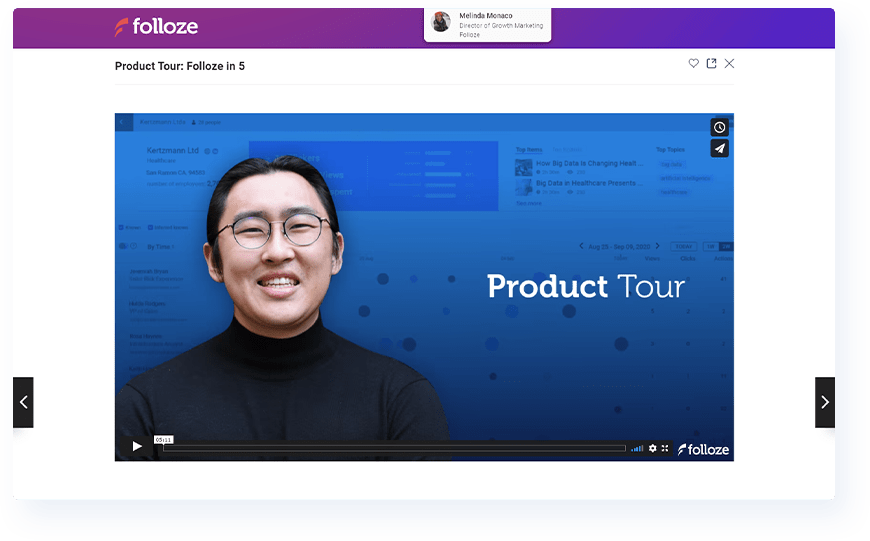
We've made a number of small enhancements to the default item viewing experience for Board visitors with the goal of giving the content experience a more modern look and feel. This includes tweaks to the background color, icons and font/text, but if we've done our job right, you shouldn't even be able to tell that anything was "changed" in the first place.
COMING SOON
Get Link: New Shortcuts
There isn't any change to the 'Get Link' functionality to announce, but very soon, we plan to make some small UI tweaks so it's easier to access this feature in the first place. In the next couple of days, you'll find new 'Get Link' shortcuts in the following places:
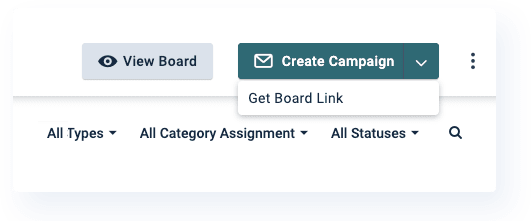
First, you'll find a new drop-down menu that has this shortcut under the Create Campaign button which can be found in the top right of any Board.
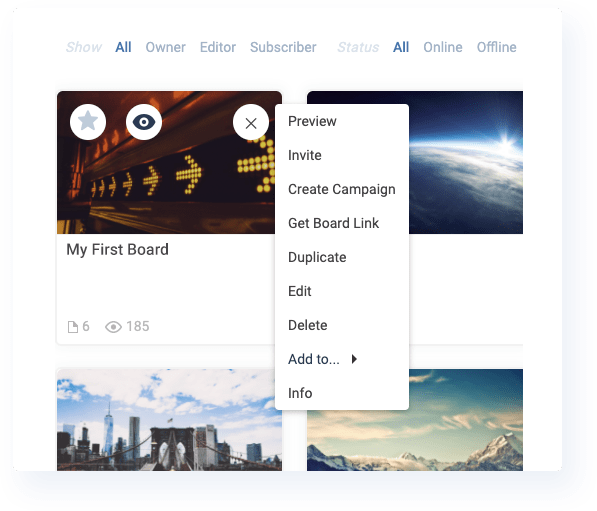
Second, you'll even be able to access this shortcut without having to open a Board in the first place. From the Boards menu (for most, this is your default home page in Folloze), you can find the shortcut by hovering over a Board and clicking the settings icon in the top right of the Board thumbnail.
NOTE TO READERS
Wow! This month's post means we've been publishing these Product Spotlights on schedule for 8 straight months now. Anyone who's worked in a start-up before knows the sense of accomplishment that comes from saying something along those lines.
As a bit of a tech geek (or "gadget head", as I like to say it), it's been pretty exciting being involved with each release, small or large, and it's cool seeing the full product roadmap to understand what the "next big thing" for our customers will be. It almost feels like seeing a movie screening before its theatrical release, and if anything, it's just as hard not to "spoil" the movie for people before they have a chance to see it themselves.
For those of you that made it this far, a quick question for you. Is there anything else you'd like to see covered or included within our monthly Product Spotlight? I'm always looking to improve and would love to hear what you think. Feel free to reply to our Product team or email me directly if you have an idea or two!
See y'all next month :)
- Ryan 'Yooster' Yoo